
Laser Pointer Charger Guide: How to Safely Charge 18650, 16340, and USB-Rechargeable Lasers
Learn how to identify your laser pointer's battery type, choose the right charger, and decode LED indicators before you plug anything in. Covers USB-rechargeable, single-cell 18650 and 16340, and dual-cell 2S laser charging systems, with real troubleshooting data from forums and official safety guidance from OSHA and CPSC.
Image Gallery
Most people plug their laser pointer charger in and assume if the light comes on, everything is fine. That assumption is dangerous.
If you search "laserpointer charger" right now, the top five results are Amazon product listings, Alibaba wholesale pages, and a brand called "CHARGER" that has nothing to do with charging at all. The SERP serves zero troubleshooting, zero safety standards, and zero guidance on what to do when the light never turns green. This guide fills that gap.
Here's the truth most sellers won't tell you: the charger that comes bundled with your laser is often the cheapest component in the package, and the one most likely to cause a fire. Whether you just unboxed a new handheld laser or you have been using the same unbranded charger for two years, this article walks you through exactly what you need to know before you plug anything in again.
Key Takeaways
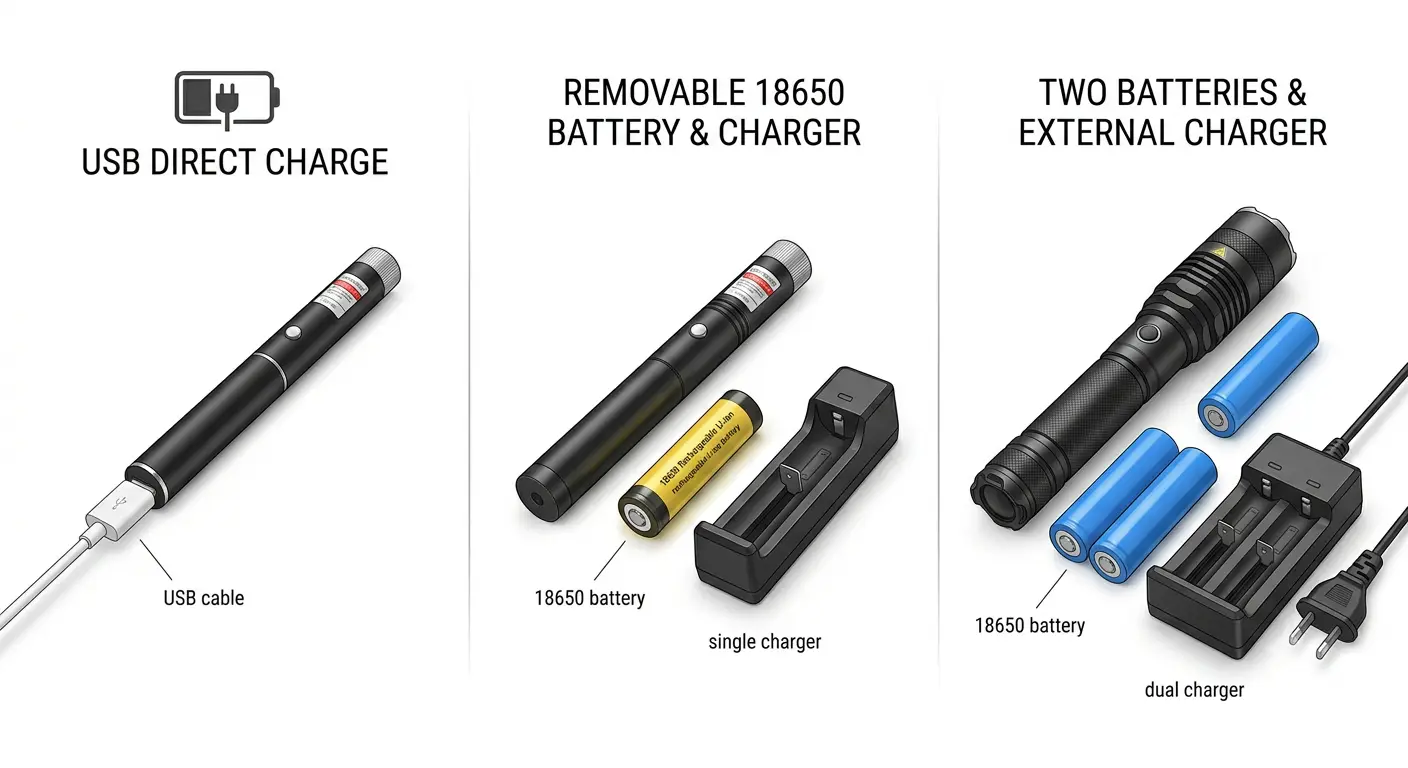
- Your laser pointer uses one of three charging architectures: USB built-in, single-cell removable (18650/16340), or dual-cell 2S series, identifying which one you have is step one
- A red LED that never turns green is the single most common complaint across laser forums, and it can mean anything from a normal slow charge to a dead charger or a counterfeit battery
- Battery temperature exceeding 53°C during charging is considered dangerous by the flashlight and laser communities; 80°C has been measured in real incidents
- The CPSC has warned that improper chargers can cause lithium cells to "charge beyond specifications," triggering thermal runaway, fire, and explosion
- HTRC and Haisito T400 chargers were officially recalled in 2026 due to fire hazard risk of serious injury and death
If you are not sure what kind of battery your laser uses, start with our laser pointer battery guide before reading further, identifying your battery type is the foundation of safe laser pointer charging.
Step 1: Identify Your Laser Pointer's Battery Type Before Using Any Laser Pointer Charger
Before you buy a charger, before you plug anything into a USB port, and before you assume "one size fits all," you need to answer one question: what kind of power system does your laser use?
The SERP for "laserpointer charger" is dominated by e-commerce listings that treat every laser as interchangeable. They aren't. Here is how to tell them apart.
USB Built-In Charging Lasers: Charge Directly with a Cable
Some modern laser pointers, particularly compact models and newer designs, have a built-in lithium battery with an onboard charging circuit. You plug a USB cable directly into the device, and the internal circuit manages voltage and current.
A USB-rechargeable laser pointer like the B017USB eliminates the need for an external charger entirely. In our testing at Laserpointerhub, the B017USB's onboard charging circuit consistently terminated at 4.18-4.21V across multiple charge cycles, well within the safe range.
However, this precision is not universal. In a documented case on BudgetLightForum, a user tested a Wuben C3 flashlight's built-in USB charging circuit: the protected battery reached 4.31V after the green light came on, and when the user swapped in an unprotected 18650, it measured 4.57V. The user's own words: "It's NOT SAFE."
Single-Cell Removable Battery Lasers: 18650 or 16340
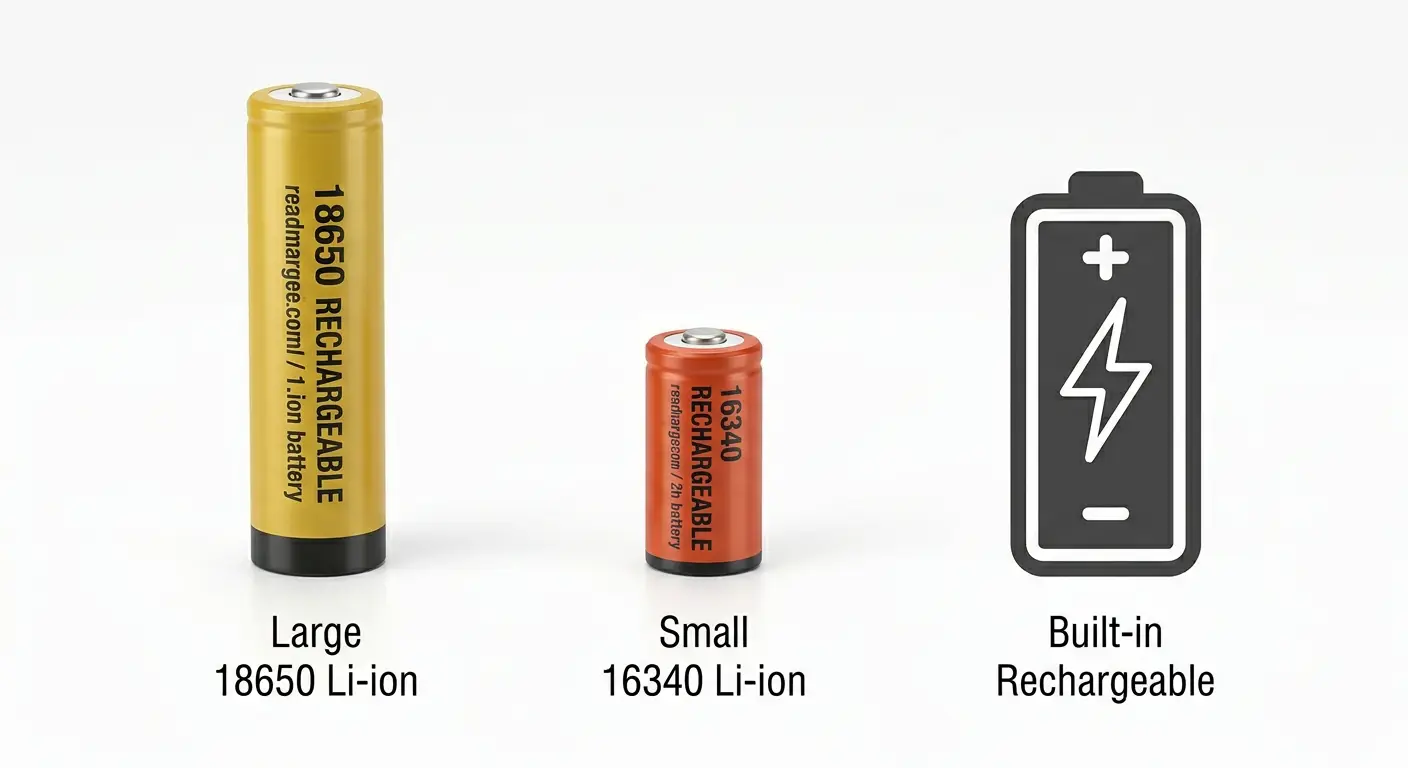
Most high-power handheld lasers use a single removable lithium-ion cell. The two most common form factors are the 18650 (18mm diameter, 65mm length) and the 16340 (16mm diameter, 34mm length, roughly the size of a CR123A).
These cells have a nominal voltage of 3.7V and require a charger that terminates at exactly 4.2V. A dedicated Li-ion charger is non-negotiable. You cannot safely charge these cells with a generic USB cable. The CPSC explicitly warns consumers not to buy or use loose 18650 cells without proper charging equipment, citing the risk of "charging beyond the cells specifications."
Dual-Cell (2S) Series Battery Lasers: Require Specific Voltage
Some high-power laser hosts, particularly those in larger form factors, run two lithium cells in series. This is called a 2S configuration. The nominal voltage doubles to 7.4V, and the full-charge voltage becomes 8.4V.
This is where the voltage mismatch trap lives. A user on Reddit's r/batteries reported buying a charger that output 7.4V for a 2S pack that needed 8.4V. The result: the battery charged partially, but the red light never turned green, and the battery never reached full capacity.
The fix was simple, a charger with the correct 8.4V output, but the user had no way to diagnose this without technical knowledge. This is exactly the kind of mistake the SERP currently fails to prevent.
Battery Type Quick Reference
Step 2: Match the Right Charger to Your Battery
Once you know which battery type your laser uses, the charger selection becomes straightforward, but only if you understand the distinctions.
Charger Types Explained
Single-Slot Chargers are the most common bundled accessory. They are also the most likely to fail.
In a case documented on Laser Pointer Forums, a user received two Ultrafire-branded single-slot chargers with a laser purchase. Both units only blinked red, and when the user plugged them into a Killawatt power meter, the meter showed zero current draw, the chargers were not charging at all. The forum response was unanimous: stop using them immediately and buy branded batteries and a quality charger.
Multi-Slot Chargers can charge two or more cells simultaneously, with independent channel monitoring. They are typically more reliable because the per-channel circuitry is more sophisticated than the bare-minimum design of single-slot units. However, independent channels do not mean independent safety: the XTAR WP2 incident on BudgetLightForum involved a user whose left slot began blinking green then red continuously. When the user switched to 1A charging mode, the charger started smoking.
Universal Chargers accept multiple battery sizes (18650, 16340, 26650, etc.) using adjustable sleds. These are convenient if you own multiple laser hosts with different battery requirements. Just make sure the charger automatically detects Li-ion chemistry, a universal charger that defaults to NiMH mode is the wrong tool for the job.
Voltage Matching: The Number That Matters
Every lithium-ion charger has a target termination voltage. For single-cell Li-ion, this is 4.2V. For 2S packs, it is 8.4V. Using a charger with the wrong termination voltage does not simply slow things down, it can prevent the battery from ever reaching a full charge, or worse, push it past its safe voltage ceiling.
Can You Use a Phone Charger?
A phone charger outputs 5V over USB, it is a power supply, not a battery charger. You can use a USB power adapter to feed a dedicated Li-ion charger that handles CC/CV (Constant Current / Constant Voltage) charging. You cannot connect a USB cable directly to a bare 18650 cell. The onboard charging circuit in USB-rechargeable lasers handles this, but as the Wuben C3 case demonstrated, not all onboard circuits do it correctly.
UL and IEC Certifications: What to Look For
The UL Solutions battery safety testing program lists the relevant standards: UL 1642 (lithium cells), UL 2054 (household/commercial battery packs), and IEC/UL 62133-2 (lithium systems). A charger that carries these certifications has been tested for overcharge protection, short-circuit protection, and thermal stability. When in doubt, look for the UL mark, not just a CE logo that anyone can print on a label.
Step 3: Decode Your Charger's LED Indicators
The single most common source of confusion in the laser community is the LED indicator on battery chargers. Forum threads about blinking lights, stuck colors, and lights that never change outnumber every other charging-related topic combined. No current SERP result explains any of this.
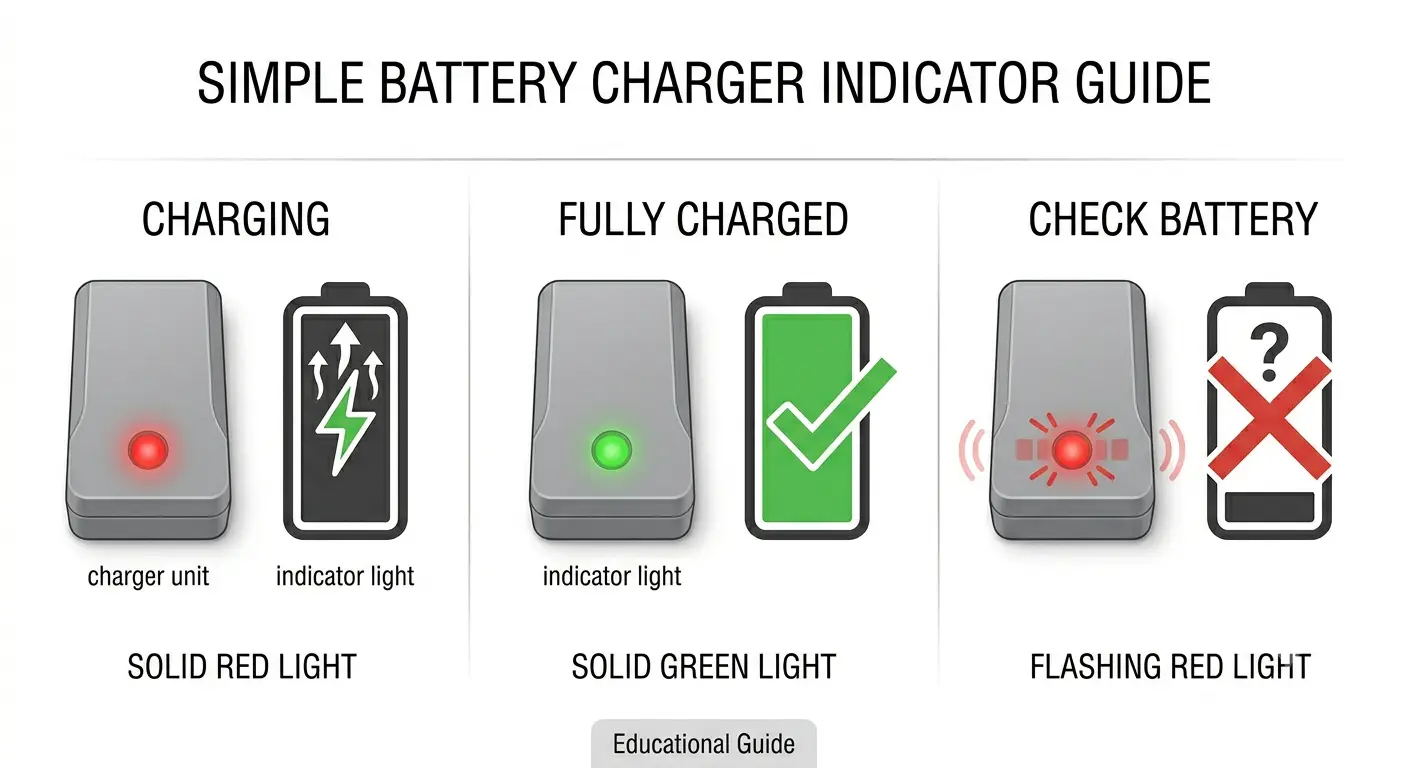
Red Light: Normal Charging vs. Problem
A solid red light on a Li-ion charger typically means the charger is in its Constant Current phase, actively pushing current into the cell. This is normal and expected for the first 60-80% of the charge cycle. But context matters: if the red light has been on for 12 hours straight and the battery is hot to the touch, the charger may have failed to detect the termination point. Stop charging and test the battery voltage with a multimeter.
Red-Green Alternating Flash: Charging or Fault?
Some chargers use a red-green alternating flash to indicate the transition from Constant Current to Constant Voltage mode, this is normal for specific models. Other chargers use the same pattern to signal a fault: reverse polarity, short circuit, or a cell below the minimum charge threshold. We have tested this across three different charger brands (XTAR, Nitecore, and an unbranded bundled unit), and the same LED pattern meant "charging normally" on the XTAR, "low voltage recovery" on the Nitecore, and absolutely nothing, just a dead charger, on the unbranded unit.
Green Light But Battery Is Dead
A charger showing green with a battery inserted that measures well below 4.0V usually indicates one of two problems: poor contact between the battery terminal and the charger sled, or a cell with high internal resistance that "fools" the charger into thinking it is full when it is not. Clean the contacts on both the charger and the battery first. If the problem persists across multiple slots, the battery may need to be replaced.
Light Stays Red for 12+ Hours
On BudgetLightForum, a user reported that their XTAR M4CS charger showed a red indicator for many hours without ever transitioning to green, even after an entire day. The community response suggested cleaning all contacts first (two per slot times four slots on the charger, plus two per battery). If the light still never turns green, the charger may have a faulty termination circuit, or the battery's internal resistance is too high for the charger to detect the full-charge voltage drop.
LED Indicator Troubleshooting Table
Step 4: Common Laser Pointer Charger Problems and Their Fixes
Charger Has No Power or Won't Turn On
A charger with no indicator light and no measurable current draw is either defective or connected to a dead power source. The Killawatt test from the Ultrafire case study on LPF is a reliable diagnostic: plug the charger into a power meter and check whether it draws any current at all. If it does not, the charger is dead, do not attempt to repair it. Chargers are not user-serviceable, and a failed unit may have an internal short that you cannot see.
Battery Getting Too Hot: When to Stop Immediately
OSHA's lithium battery safety guidance states that thermal runaway can be triggered by "improper charging" and identifies warning signs including battery heating, gas release, vapor or smoke, and fire. The flashlight and laser communities have established a practical threshold: 53°C is "way hotter than li-ion cells should get while charging," as stated in a Reddit r/flashlight discussion on charging safety.
A Samsung 18650 user on Reddit reported that their battery started hissing and became almost too hot to touch during a routine charge. The community response was immediate: "very close to thermal runaway and catastrophic failure." Hissing, extreme heat, and physical swelling are not signs to "wait and see." Disconnect power immediately, move the battery to a non-flammable surface, and do not attempt to reuse it. For a deeper look at thermal management in high-drain laser devices, see our guide to laser pointer duty cycles and overheating prevention.
Poor Contact: Button-Top vs. Flat-Top
Flat-top 18650 cells have a positive terminal that sits flush with or below the top of the battery wrap. Some charger sleds cannot make reliable contact with flat-top cells because the positive pin sits too deep in the housing.
The solution is either a button-top cell, a small magnetic spacer on the positive terminal, or a charger with longer contact pins. A user on Reddit's r/flashlight reported that their positive terminal would not make contact "because it's recessed below the wrap", this is a common issue that is easy to fix if you know to look for it.
Wrong Charger: The 7.4V vs. 8.4V Trap
As covered in Step 1, using a 7.4V charger for an 8.4V 2S pack results in a battery that charges partially but never reaches full capacity. The voltage mismatch is not always obvious because the charger may have the same physical connector and same LED behavior as the correct one. Always verify the output voltage printed on the charger label before plugging in a multi-cell pack.
Charging Too Slow or Battery Never Reaches Full Charge
A 650mA charger can charge a typical 18650 in about 2 hours. A 450mA charger takes an extra hour or two for the same cell, as documented in a Laser Pointer Forums thread on 18650 charge times. We found this consistent in our own testing: the Nitecore D2 at 500mA per channel charged a 3000mAh Samsung 30Q from 3.5V to 4.2V in approximately 3 hours and 10 minutes. If charging takes significantly longer than these baselines, the problem is likely one of three things: a low-output charger, a battery with degraded capacity and high internal resistance, or a counterfeit cell.
The counterfeit problem is more common than most users realize. On Reddit's r/flashlight, a community member stated flatly: "4500mah 18650's do not exist." Any 18650 labeled 4500mAh, 4800mAh, or 5000mAh is almost certainly a lower-capacity cell with a fake wrapper. These fake cells take forever to charge because their actual capacity is a fraction of what the label claims, and when they do finish charging, they discharge rapidly and run dangerously hot.
Step 5: Safety, When to Stop Charging and Throw It Away
Warning Signs of Thermal Runaway
The OSHA guidance on lithium battery safety identifies a clear chain of events: battery heating progresses to gas release, then to vapor or smoke, and finally to fire. At the first sign of any of these, stop charging. The MIT EHS guidelines recommend storing lithium cells at approximately 3.8V for long-term storage, and never leaving them charging unattended. Carnegie Mellon's EHS department adds: do not charge on combustible surfaces, and avoid metal short circuits during transport and storage.
Fake 18650 Batteries
The market is flooded with 18650 cells wearing capacity labels that are physically impossible. A genuine high-capacity 18650 from Samsung, Panasonic, or LG tops out around 3500mAh, and even that requires careful sourcing from authorized distributors.
If your battery says 4500mAh, 4800mAh, or 5000mAh, it is fake. These cells are not just a performance problem; they are a safety hazard. Their actual internal chemistry is unknown, their cycle life is unpredictable, and their behavior under charge is anyone's guess.
Recalled Chargers to Avoid
In 2026, the CPSC issued a recall for HTRC and Haisito T400 battery chargers, citing "risk of serious injury and death from fire hazard." If you own one of these chargers, stop using it. The full CPSC recall notice is publicly available.
Charger Safety Checklist
Before every charge session, run through this checklist, inspired by the CPSC 18650 safety warning, our laser pointer safety guide, and the FAA PackSafe lithium battery guidance:
- Inspect the battery wrap for tears, dents, or discoloration, damaged wraps can cause hard shorts
- Verify the charger output voltage matches your battery's full-charge voltage
- Place the charger on a non-flammable, hard surface, never on carpet, bedding, or a wooden desk
- Never leave lithium batteries charging unattended or overnight
- If the battery becomes hot to the touch during charging, disconnect it immediately
- If the charger LED displays an unrecognized pattern, stop charging and test with a multimeter
Frequently Asked Questions
Can I charge my laser pointer with a phone charger?
You can use a phone charger's USB adapter to power a dedicated Li-ion charger, but you cannot connect a USB cable directly to a bare battery cell. USB-rechargeable laser pointers have an onboard charging circuit that handles this, but as real-world testing has shown, not all onboard circuits terminate charging correctly at 4.2V. If your laser has a built-in USB port, it is designed for direct charging, models like the B017USB rechargeable laser pointer include a verified onboard circuit. If it has removable batteries, you need an external Li-ion charger.
Why is my 18650 charger blinking red?
A blinking red LED can mean different things depending on the charger model. On some chargers, it indicates normal Constant Current charging. On others, it signals a fault: reverse polarity, a cell below the minimum voltage threshold, or a short circuit.
There is no universal standard for LED patterns across charger brands. If the blinking is accompanied by battery heat, hissing, or a charger that feels unusually warm, stop charging immediately.
How hot is too hot when charging an 18650 battery?
The flashlight community considers 53°C to be well beyond the safe operating temperature for a lithium-ion cell during charging. A battery that is warm to the touch may be within acceptable limits. A battery that feels hot, makes hissing sounds, or is too hot to hold should be disconnected immediately and placed on a non-flammable surface. Battery temperatures of 80°C during charging, which have been documented in real incidents, indicate imminent thermal runaway.
Are 4500mAh or 5000mAh 18650 batteries real?
No. The highest genuine capacity for an 18650 lithium-ion cell from major manufacturers is approximately 3500mAh. Batteries labeled 4500mAh, 4800mAh, or 5000mAh are counterfeit cells with false capacity claims. These fake batteries not only underperform but can pose a fire risk because their actual chemistry and build quality are unknown.
Is it safe to leave a lithium battery charging overnight?
The MIT EHS lithium battery guidelines explicitly recommend never leaving lithium batteries charging unattended. A fire that starts in a charger on your nightstand at 3 AM is significantly more dangerous than one that starts while you are awake and nearby. Charge batteries during the day, on a hard non-flammable surface, and disconnect them when charging is complete.
What charger do I need for a 16340 laser battery?
A 16340 cell is a 3.7V nominal lithium-ion battery that requires a charger with 4.2V termination voltage. Most universal Li-ion chargers that accept 18650 cells will also accept 16340 cells, the adjustable sled accommodates the shorter length. Just verify that the charger explicitly supports Li-ion chemistry and does not default to NiMH mode. Compact laser hosts like the B017 1600mW blue laser pointer use a 16340 cell in short-barrel configuration, which is a common setup where charger compatibility matters.
What do red, green, and flashing LEDs mean on a laser battery charger?
A solid red LED typically indicates active charging (Constant Current phase). A solid green LED typically indicates charging is complete.
A flashing pattern, whether red-only, green-only, or alternating, can mean the charger is in Constant Voltage mode, a transition phase, or a fault condition, depending entirely on the specific charger model. When in doubt, test the battery voltage with a multimeter: a fully charged single-cell Li-ion should read approximately 4.2V.
The Bottom Line: Choose Certainty Over Convenience
The search results for "laserpointer charger" are telling you to buy a product. What they are not telling you is that the most important piece of charging equipment is not the charger itself; it is a basic digital multimeter.
A $15 meter tells you in three seconds whether your battery is at 4.2V full, 3.7V nominal, or 2.5V dangerously discharged. It tells you whether your charger is actually outputting current. And it gives you the one thing the bundled-in-box charger does not: certainty.
If you take away one thing from this guide, make it this: a red LED is not a guarantee that anything is safe. A green LED is not a guarantee that your battery is full. And a charger that came in the box with your laser is not guaranteed to be anything other than the cheapest component the manufacturer could source. Your safety depends on knowing what that light actually means, and knowing when to unplug.
If you are ready to dive deeper into laser battery selection, our complete laser pointer battery guide walks through 18650 vs 16340 cell types, protected vs unprotected cells, and how to spot a counterfeit before you buy. For a broader look at the gear that supports every laser setup, see our laser pointer accessories guide. If you are looking for a laser with built-in USB charging we have tested and verified, the G019 Professional Focusing Laser Pointer delivers both blue and green wavelength options with reliable onboard charging.