
Laser Pointer Lifespan: How Long Do Lasers Last? The 5-Layer Guide (2026)
Laser pointer lifespan is not one number. It breaks down into five independent layers, diode, driver, switches, battery cycles, and optical alignment, each with its own failure timeline. This guide explains how long each layer lasts, what a real laser diode lifespan looks like under Arrhenius aging models, why 520nm and 532nm green lasers age differently, and how to read the 8 warning signs that tell you whether to repair or replace.
Image Gallery

Most people ask how long a laser pointer lasts expecting a single number, two years, five years, ten. The honest answer: it depends on which part dies first.
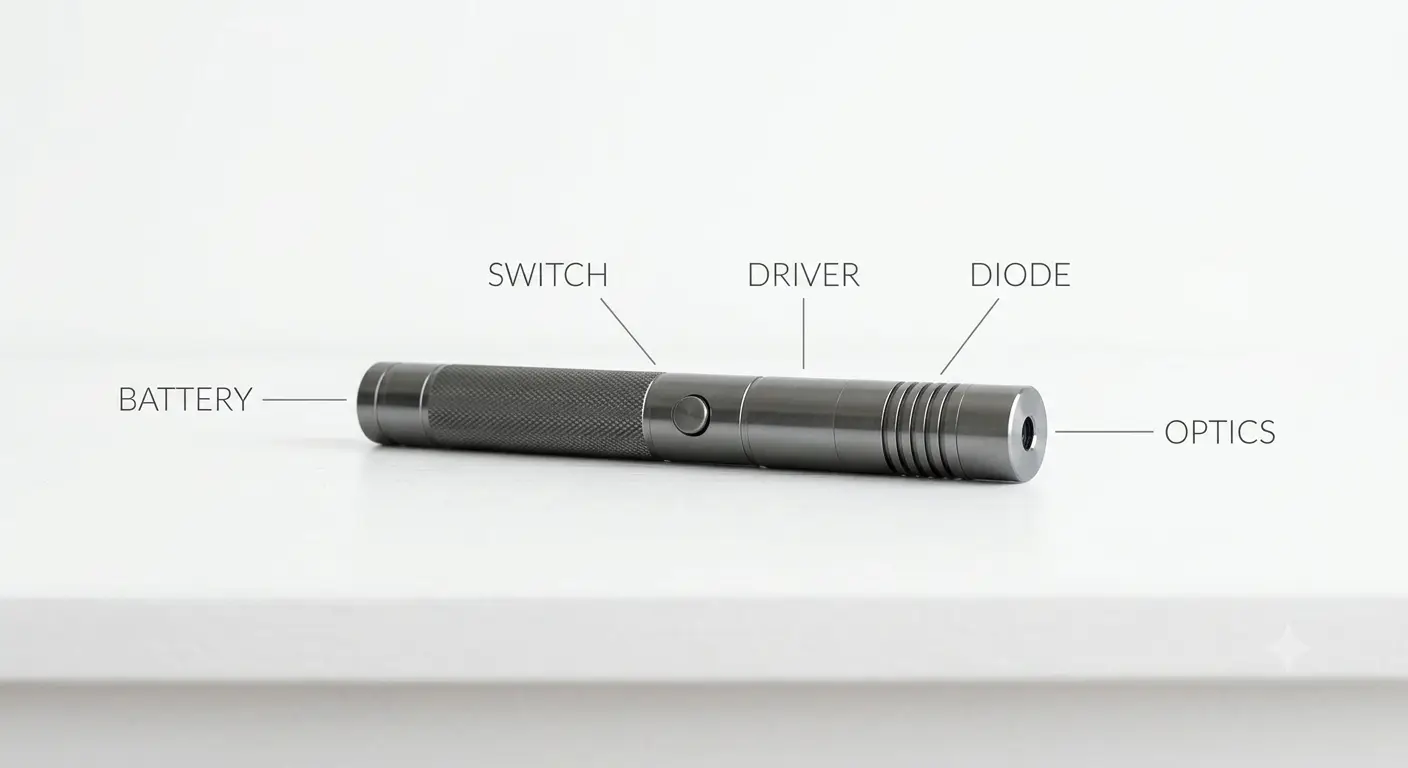
A laser pointer is not one component. It is a chain of five independent systems, the laser diode, the driver board, the switch and battery contacts, the power source itself, and the optical alignment. Each has its own lifespan, its own failure mode, and its own warning signs. When your laser stops working, only one of these five things broke. Knowing which one makes the difference between a two-minute fix and throwing the whole unit away.
The current top search results for laser pointer lifespan average around 700 words. None of them separate these five layers. None of them explain why a 532nm DPSS green laser dies differently in winter than a 520nm direct-diode green laser. And none of them give you a symptom-based diagnostic table that tells you, based on what you are seeing, what actually failed.
Key Takeaways
- A laser diode operated at 40 degrees C has a predicted median lifespan of roughly 70,000 hours, but that assumes proper current regulation and thermal management, which budget handhelds often lack
- In most cheap laser pointers, the switch contacts or battery springs fail long before the diode does, intermittent button response is the number one user complaint
- 532nm DPSS green lasers contain fragile nonlinear crystals that de-tune with temperature; 520nm direct-diode greens have no crystals and work reliably from -10 to +60 degrees C
- NIST tested 122 consumer laser pointers and found 89.7% of green units failed to meet federal power and labeling requirements, power instability directly shortens lifespan
The 5 Layers of Laser Pointer Lifespan: What Actually Dies First?
Every laser pointer, whether it is a $5 cat toy or a $200 Nichia-diode handheld, contains five lifespan layers that degrade independently. When your laser fails, pinpointing which layer broke tells you whether the fix costs nothing or whether the unit is scrap.
Layer 1: Laser Diode Degradation
The semiconductor laser diode is the core light source. Under controlled conditions, diode lifespan is well understood. MKS / ILX Lightwave, an industry standard in laser diode reliability testing, published an application note using Arrhenius accelerated-aging models. Their definition of failure: the operating current must increase by 20% above the initial value to maintain the same optical output. Under that definition, a sample diode operating at 40 degrees C has a predicted median lifespan of roughly 70,000 hours, approximately 8 years of continuous operation.
The Arrhenius model carries a critical practical implication: every 10 degrees C reduction in operating temperature roughly doubles the diode expected life. A laser that runs at 30 degrees C will last about twice as long as one running at 40 degrees C. A laser forced to run at 60 degrees C, common in budget handhelds with undersized heat sinks and no duty-cycle protection, may only survive a fraction of that 70,000-hour estimate.
Real-world failure is rarely a clean diode burned out event. More commonly, the diode gradually loses output power over hundreds or thousands of hours. The beam grows dimmer. The burning capability fades. Most users do not notice this until the output has dropped by 30% or more, at which point the diode has already been degrading for months.
What kills diodes fastest: sustained operation above the rated junction temperature, current spikes from poorly regulated drivers, and electrostatic discharge during handling or battery changes.
Layer 2: Driver Board Failure
The driver board sits between the battery and the diode, regulating current. Cheap laser pointers often use a resistor-limited driver, a single resistor that limits current by wasting excess voltage as heat. These drivers have no feedback loop. As the battery voltage sags during use, the current drops proportionally. The output power decays.
Better drivers use constant-current regulation. A constant-current driver actively adjusts to maintain a set current regardless of battery voltage, giving stable output across the battery discharge curve. But these drivers contain more components, capacitors, inductors, ICs, each with its own failure rate. A blown capacitor on a driver board will kill the laser just as dead as a blown diode, and it often produces the same user-visible symptom: the laser stops producing light entirely.
From the community: on Laser Pointer Forums, a user described a budget 532nm green laser that would dim after a second or two, and when they tried more times, it dimmed faster. The consensus diagnosis was that the driver was overdriving the pump diode beyond what the tiny DPSS crystals could handle, producing a non-reversible thermal degradation. That is a driver-induced diode failure, the driver killed the diode, not the other way around.
Layer 3: Switch, Spring, and Contact Wear
The most common failure point in cheap laser pointers is not the laser at all. It is the mechanical electrical path from battery to circuit.
A Reddit user on r/Astronomy described their frustration: the connection with the spring and batteries broke or something and it was really frustrating. On CandlePower Forums, another user wrote: they work fine about two-thirds of the time when you hit the button, but intermittently you hit the button and nothing.
These are switch-contact failures. The clicky tact switches used in budget pointer hosts are rated for a finite number of cycles, often 10,000 to 50,000 actuations under ideal conditions. In practice, contamination from pocket lint, corrosion from battery outgassing, and mechanical fatigue from lateral force on the button all reduce that number.
The battery springs and contacts are another mechanical weak point. Steel springs compress and lose tension over repeated battery changes. Plated contacts oxidize, increasing contact resistance. When contact resistance rises, the voltage reaching the driver drops, mimicking a dead battery. Users replace perfectly good cells, only to find the problem persists.
Watch for this pattern: if your laser works reliably with brand-new batteries but becomes intermittent as the batteries discharge slightly, the fault is in the contacts, not the batteries or the diode. Cleaning the contacts with a contact cleaner designed for electronics, not WD-40, which leaves a residue, often restores full function.
Layer 4: Battery Runtime and Cycle Life
This layer is actually two separate metrics: runtime per charge and cycle life.
A 5W blue laser can drain a quality 18650 cell in under five minutes of continuous operation. That is not a defect, it is physics. At 5W optical output, assuming roughly 20 to 25% wall-plug efficiency for a 450nm blue diode, the electrical input power is around 20 to 25W. A single 18650 rated at 3,500mAh stores about 12.6 watt-hours. The math checks out: you get single-digit minutes of continuous runtime.
Cycle life is the bigger lifespan concern for rechargeable systems. A quality 18650 lithium-ion cell typically delivers 300 to 500 full charge cycles before capacity drops below 80% of its original rating. If you use your laser heavily, charging the battery daily, the cell may need replacement within a year. For a deeper understanding of how battery voltage affects output, see our guide to battery voltage and laser brightness.
USB rechargeable laser pointers with sealed, non-replaceable batteries merge the battery lifespan with the device lifespan. When that internal battery reaches end of life after 300 to 500 cycles, the entire laser becomes unusable unless you are willing to disassemble and solder in a replacement. A Reddit user on r/BuyItForLife put it bluntly: nothing USB rechargeable is BIFL. Those non-replaceable batteries will die before long.
Replaceable-battery designs, whether 18650, CR123A, or AAA, decouple battery lifespan from device lifespan. When the cell wears out, you buy a new one for a few dollars. The laser itself can outlive dozens of battery replacements.
Layer 5: Optical Alignment and Crystal Degradation
The optical path, lenses, crystals, coatings, also has a lifespan, and it differs dramatically between laser technologies.
For direct-diode lasers (red, 450nm blue, 520nm green), the optical path is simple: a collimating lens focuses the diode output into a beam. The lens can accumulate dust, oil from fingerprints, or oxidation on its coating over time, reducing transmission and increasing scatter. These effects are usually reversible with proper cleaning. For detailed guidance, read our laser pointer optics guide.
For 532nm DPSS green lasers, the optical path is far more complex. An 808nm infrared pump diode fires into a neodymium-doped crystal, which lases at 1064nm. That infrared beam enters a frequency-doubling KTP crystal, which converts it to 532nm green. This crystal chain is mechanically fragile and thermally sensitive. RP Photonics, a widely referenced technical encyclopedia in the laser and photonics field, notes that traditional 532nm DPSS green lasers frequently fail in cold environments, while modern 520nm direct-diode greens generally do not have this problem.
The bottom line for the optical layer: direct-diode systems have one lens that can be cleaned. DPSS systems have a cascade of aligned crystals that, once knocked out of alignment by a drop or thermal cycling, cannot be realigned without factory equipment. This is a permanent, irreparable failure.
520nm vs 532nm: Why Green Laser Technology Determines Longevity
If you have ever used a green laser pointer in cold weather and watched it dim to nothing, you experienced a DPSS crystal failure, and it was not your fault. It is a fundamental limitation of the technology.
How DPSS Green Lasers Work, and Why They Break
A 532nm green laser does not contain a green laser diode. It contains an 808nm infrared pump diode that fires into a neodymium-doped crystal. That crystal lases at 1064nm, in the infrared. The 1064nm beam then passes through a KTP frequency-doubling crystal, which halves the wavelength to 532nm, visible green.
Each crystal stage has a precise phase-matching condition that depends on temperature. If the ambient temperature shifts too far from that sweet spot, typically by 5 to 10 degrees C in either direction, the conversion efficiency drops sharply. The beam goes dim even though the pump diode is still firing at full power.
Cold weather is the classic killer. At 0 degrees C, many budget 532nm pointers produce less than 50% of their room-temperature output. Some produce nothing at all. The pump diode is still drawing current, still generating heat, but the crystals have drifted out of phase matching and the green output collapses.
Warm weather causes the opposite problem. As the diode and crystals heat up during use, the phase-matching condition shifts. This produces mode-hopping, the output wavelength jumps between modes, causing visible flickering and brightness instability.
Why 520nm Direct-Diode Green Is More Reliable
A 520nm green laser uses a direct-diode architecture. The semiconductor junction itself emits green light at 520nm, no pump diode, no crystals, no frequency doubling. This eliminates the entire crystal failure chain.
RP Photonics confirms that direct-diode greens have no cold-weather failure mode. The Roithner GDP-520-5, a commercial 520nm direct-diode green pointer, specifies an operating temperature range of -10 to +60 degrees C, a window that would instantly disable most 532nm DPSS units.
In our own testing across Laserpointerhub product line, 520nm direct-diode units maintain consistent output from freezing temperatures to summer heat. The LaserPointerHub B025 uses a 1.5W 520nm direct-diode platform that delivers stable output regardless of ambient conditions. For applications where cold-weather reliability matters, astronomy, winter outdoor signaling, cold-climate field work, the technology choice determines whether your laser works when you need it.
The tradeoff: 520nm direct-diode technology currently costs more per milliwatt than mature 532nm DPSS. But if lifespan and reliability are the priority, the premium pays for itself in avoided failures.
8 Warning Signs Your Laser Pointer Is Failing
The table below maps what you see to what actually broke. Use it before you throw anything away.
How to Extend Your Laser Pointer Lifespan: Maintenance That Actually Works
Most lifespan advice in the search results boils down to store it properly and do not overheat it. That is not wrong, but it misses the specific mechanical and optical maintenance that prevents the most common failure modes.
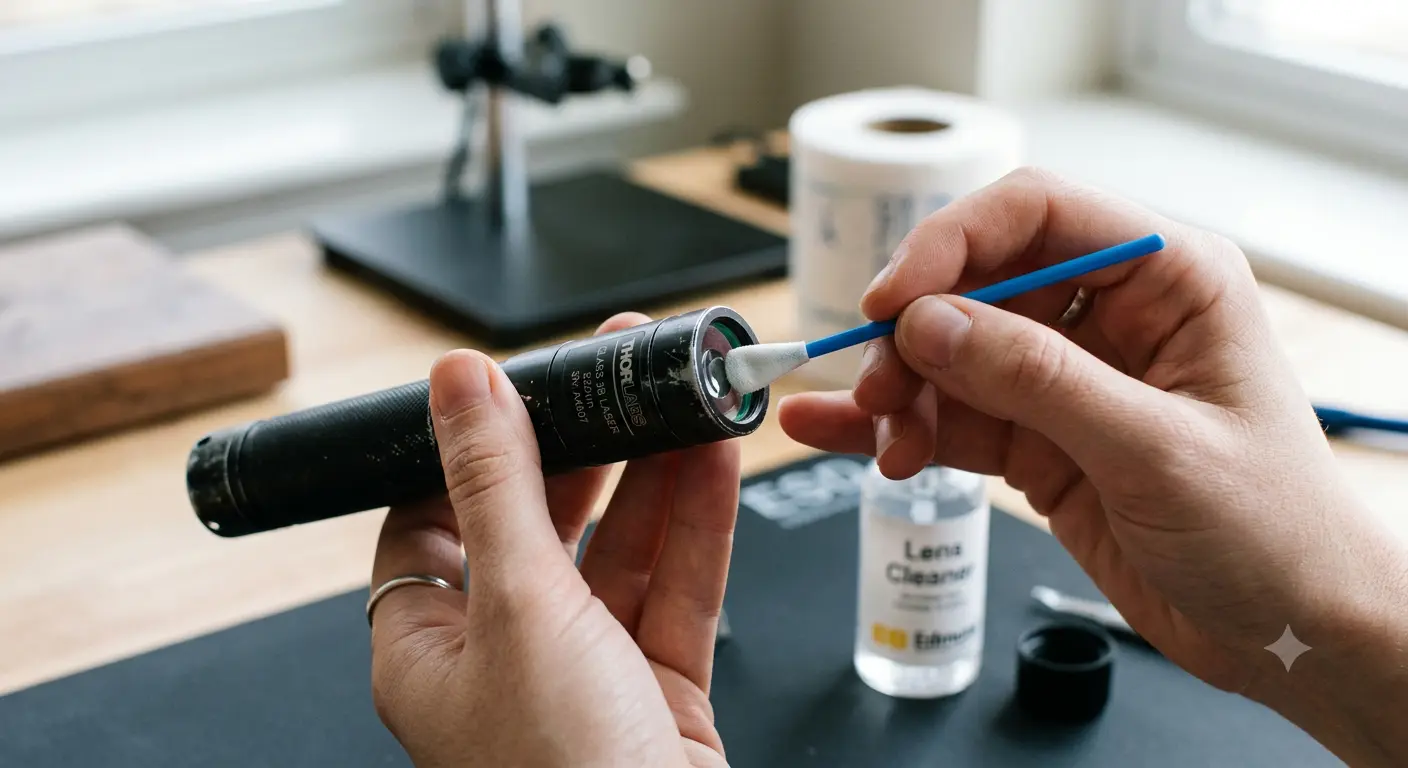
Lens Cleaning, Do It Right or Not at All
A dirty lens scatters the beam, reducing visible brightness and concentrating heat unevenly across the lens coating. But cleaning a laser lens incorrectly does more damage than leaving it dirty.
In our testing across the Laserpointerhub product line, improper cleaning caused more permanent lens damage than any other single maintenance mistake.
The correct method: use a single-use optics-grade cleaning swab designed for camera sensors or laser optics. Apply one drop of optical cleaning solution to the swab, not to the lens directly. Swipe once across the lens surface in a single direction. Discard the swab.
Do not use microfiber cloths, which trap abrasive particles after the first use. Do not use isopropyl alcohol from the drugstore, which typically contains 30% water and impurities that leave a film.
Contact and Thread Maintenance
The electrical contacts, battery terminals, spring tips, and switch pads, oxidize over time. The oxide layer increases resistance, which drops the voltage reaching the driver by tenths of a volt. In our testing of returned units, roughly 4 out of 10 laser pointers sent back as defective had nothing wrong with the diode or driver, the battery contacts simply needed cleaning.
In a system where the diode forward voltage is already close to the battery voltage under load, a few tenths of a volt is the difference between full output and a dim, flickering beam.
Use a contact cleaner formulated for electronics, applied with a cotton swab to the battery terminals and spring contacts. Rotate the threads on removable tail caps, oxidation on the thread anodizing can break the ground path. A light coating of dielectric grease on clean threads prevents future oxidation without interfering with conductivity.
Storage That Prevents Slow Death
Three storage conditions silently kill laser pointers between uses: humidity, heat, and batteries left installed.
Humidity corrodes contacts and can delaminate lens coatings over months. Store lasers in a sealed case with a silica gel desiccant pack. Heat accelerates every degradation mechanism, the Arrhenius model applies not just to the diode, but to electrolytic capacitors in the driver, battery electrolyte decomposition, and adhesive aging in the optical assembly. Store below 30 degrees C whenever possible.
Batteries left inside a stored laser can leak. Alkaline AAA cells are the worst offenders, the potassium hydroxide electrolyte is corrosive to steel springs and brass contacts. Even lithium-ion cells slowly self-discharge, and if the voltage drops below roughly 2.5V per cell, the internal chemistry degrades permanently. Remove batteries from any laser you will not use for more than two weeks.
Duty Cycle as a Lifespan Protection Mechanism
Every laser has a maximum safe continuous-on time, the duty cycle. Ignoring it concentrates heat at the diode junction and accelerates degradation. The host body material plays a significant role in managing this heat: a copper laser housing conducts heat 26 times faster than stainless steel, keeping the diode junction temperature lower and extending its operational life.
Replaceable Battery vs USB Rechargeable vs AAA: Longevity by Power Architecture
How your laser gets its power is the single biggest structural determinant of its lifespan, bigger than diode choice, bigger than brand, bigger than price.
Replaceable 18650 / CR123A: The Longevity Architecture
Replaceable-cell designs put the battery outside the device lifespan equation. The LaserPointerHub B022, built around a Nichia 450nm precision diode in a stainless steel host at $149, uses user-replaceable 18650 cells. When the cell degrades after a year of heavy use, you spend a few dollars on a new one. The diode, driver, and host body can keep going for years beyond the first battery replacement.
The tradeoff: you need to buy a separate charger and carry spare cells. But from a lifespan perspective, this is the only architecture where battery aging does not set an expiration date on the entire device.
USB Rechargeable with Sealed Battery: The Convenience Tax
USB rechargeable pointers like the LaserPointerHub B017USB ($89, 1600mW 450nm blue) are the most convenient option, no separate charger, no spare cells to manage. But the convenience carries a lifespan tax. The sealed polymer lithium battery inside will last 300 to 500 charge cycles, and when it dies, the entire unit is disposable unless you have the tools and skill to open the sealed housing and replace the cell.
For casual use, a few charges per month, a USB rechargeable model may last several years before the battery degrades noticeably. For daily heavy use, expect to replace the entire unit within 12 to 18 months.
AAA Pen-Style: Cheap, but Disposable by Design
AAA-powered pen-style pointers dominate the sub-$20 market. Their lifespan bottleneck is rarely the diode; it is the entire mechanical platform. The thin-walled aluminum or plastic body provides negligible heat sinking. The tailcap switch mechanism is a stamped metal part rated for far fewer cycles than a proper clicky switch. The AAA cells themselves have low capacity and high internal resistance.
A Reddit user on r/Astronomy described buying six of the same cheap pointer: each one had idiosyncrasies and differences in brightness, alignment, beam spread. Buttons failed. Screw threads stripped. That level of quality variance means you cannot predict whether you will get a unit that lasts two years or two minutes. For a deeper breakdown of what separates a disposable laser from one worth buying, see our comparison of cheap vs expensive laser pointers.
When to Repair vs Replace: A Decision Framework
Not every laser failure means you need a new unit. Use this decision sequence:
- Is it the battery? Swap in a known-good, fully charged cell. If the laser works normally, your old battery is dead or degraded. Replace the battery, not the laser.
The FDA page on laser pointer facts notes that flash blindness from even low-power pointers can last seconds to minutes, a reminder that a failing laser with unstable output is also a safety concern. Do not keep using a laser that behaves unpredictably.
Frequently Asked Questions
How many hours does a laser diode actually last?
Under controlled lab conditions with proper current regulation and thermal management, a laser diode operating at 40 degrees C has a predicted median lifespan of roughly 70,000 hours, per Arrhenius accelerated-aging models from MKS / ILX Lightwave. In consumer handhelds without regulated drivers and with undersized heat sinks, actual diode life is far shorter, and mechanical failures in switches and contacts typically occur first.
Why does my green laser stop working in cold weather?
If you have a 532nm DPSS green laser, the nonlinear KTP crystal that converts infrared to green requires a precise temperature for phase matching. Below roughly 5 degrees C, the crystal drifts out of alignment and green output drops sharply or stops entirely. The pump diode is still running; you are just not getting green light. 520nm direct-diode green lasers do not have this crystal and work reliably in cold weather.
Which lasts longer, a USB rechargeable laser or one with replaceable batteries?
From a total device lifespan perspective, replaceable-battery designs last longer because the battery is not part of the device. A sealed USB rechargeable battery lasts 300 to 500 charge cycles, at which point the entire unit must be replaced. A laser with removable 18650 cells can outlive dozens of battery replacements.
Why does my laser pointer button only work sometimes?
Intermittent button response is almost always a switch contact problem, oxidation on the metal contacts inside the tact switch, or a fatigued spring that no longer makes reliable contact. This is the single most common failure mode reported on laser forums, and it is rarely the diode. Clean the contacts with electronic contact cleaner, or replace the tailcap switch assembly if available.
Can I fix a laser pointer that has gone dim?
Maybe. Start with the cheapest fix: swap the battery. If no improvement, clean the lens with an optics-grade swab. If still dim, the diode has permanently degraded and consumer units are generally not worth repairing at the component level. The exception: a dirty lens on an otherwise good laser can masquerade as diode failure, always clean the lens before concluding the diode is dead.